UniPatcher (MOD)
How to install APK / APKS / OBB file on Android
Prefer apkdog.ph on GoogleHi, There you can download APK games file "UniPatcher" for Android free, apk file version is 0.17.3 to download to your android device just click this button. It's easy and warranty. We provide only original apk files. If any of materials on this site violates your rights
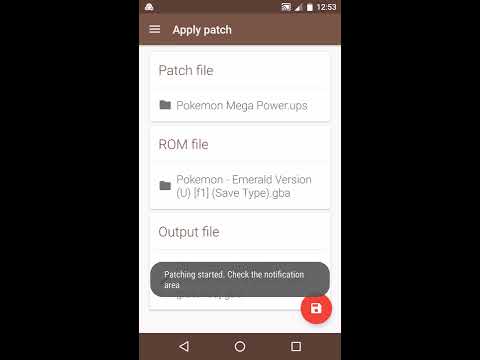
UniPatcher allows you to apply patches to game ROMs.
What is a patch?
A file with the modified data of the game. For example, a game translated from Japanese to English. You download the patch containing the translation. It must be applied to the Japanese version to make an English version of it.
This program will not help you hack native Android games, it was created for the old console games (SNES, PS1, GBA, N64, SMD\Genesis etc.)
Features:
* Supported formats of patches: IPS, IPS32, UPS, BPS, APS (GBA), APS (N64), PPF, DPS, EBP, XDelta3
* Create XDelta patches
* Fix the checksum in SMD\Genesis ROMs
* Remove the SMC header from SNES ROMs
How to use?
You have to select a ROM file, a patch and choose which file to save, then click on the red round button. Files are selected through the standard Files application (or through one of the file managers you have installed). The application will show a message when the file is patched. Do not close the application until the file is patched.
Very important:
If the game and patch is compressed (ZIP, RAR, 7z or other), they first need to be unzipped.
- Esperanto translation (thanks to Jakub Fabijan)
- Indonesian translation (thanks to Tsaqib Fadhlurrahman Soka, Lim Jia Ming, Reza Almanda)
- Kurdish (Central) translation (thanks to دیاری ئەرسەلان جەبار)
- Lithuanian translation (thanks to Gediminas Murauskas)
- Malay translation (thanks to Muhammad Ammar Bin Rozi)
- Vietnamese translation (thanks to Haibara Ai)
- Many other translations updated (thanks to everyone involved)
- LicenseFree
- File nameUniPatcher
- File Version0.17.3
- Package nameorg.emunix.unipatcher
- CategoryTools
- DeveloperBoris Timofeev
- Developer site
- Developer emailunipatcher@gmail.com
- Size2.59 MB
- UploadedMay 4, 2025
- Android5.0 or later
- md5 hash215e647f741e76d925b1cd84c592eda1
- Architecture-
- Permissions1 show
- APKSUniPatcher 0.17.3uploaded: May 04 2025 size: 2.9 MBAndroid 5.0+, arm64-v8a
- APKSUniPatcher 0.17.3uploaded: May 04 2025 size: 2.97 MBAndroid 5.0+, armeabi-v7
- UniPatcher 0.17.3uploaded: May 04 2025 size: 2.59 MBAndroid 5.0+
- UniPatcher 0.17.2uploaded: Aug 06 2022 size: 3.61 MBAndroid 5.0+, arm64-v8a armeabi-v7a x86_64 x86
- ClearTok: repost removerversion: 1.7.2updated: Nov 25 2026rating: ★9.5/10
- Split APKs Installer (SAI)version: 4.5updated: Mar 01 2021rating: ★8.3/10
- Install with Optionsversion: 0.9.0updated: Dec 04 2025rating: ★8.9/10
 8 Ball Path Finder: Line Toolversion: 1.1.2updated: Nov 06 2026rating: ★6.9/10
- GBA Emulator: My Retro Gameboyversion: 2.5.0updated: Sep 12 2026rating: ★9.2/10
- SSME - 8K Live WallPaperversion: 9.1.23updated: Nov 25 2026rating: ★3.6/10
- GeForce NOW Cloud Gamingversion: 6.40.39245610updated: Nov 05 2026rating: ★7.1/10
- Love8 - App for Couplesversion: 3.28.0updated: Nov 23 2026rating: ★9/10
- Shizukuversion: 13.6.0.r1086.2650830cupdated: Sep 11 2026rating: ★8.5/10
- Philippines VPN Freeversion: 1.0updated: Jul 08 2021rating: ★0/10
- LDCloud-Cloud Phone for Robloxversion: 4.0.5updated: Nov 12 2026rating: ★6.5/10
- Uncle Bads Toolsversion: 1.55updated: Sep 04 2025rating: ★0/10
- Dodo Music: Auto Game Clickerversion: 2.0.18updated: Nov 11 2026rating: ★6.6/10
- IZPH VPN PROversion: 6.0updated: Oct 27 2026rating: ★8.6/10
- Double Tap Screen On and Off -version: 1.9updated: Jul 13 2024rating: ★4.9/10
- QuickFox加速器-海外华人必备回国加速器version: 3.68.1updated: Nov 25 2026rating: ★8.5/10
- Magic Tuner: FPS & Lag Fixversion: 8.2.2-r260829 freeupdated: Sep 11 2026rating: ★8.7/10
- Philippines VPN - PH VPNversion: 20261131updated: Nov 22 2026rating: ★8.9/10
- LagoFast Game Booster: Low Lagversion: 1.36.1updated: Nov 24 2026rating: ★6.3/10
- TeraTV - Short Drama & Reelsversion: 3.5.1updated: Nov 17 2026rating: ★7/10
- Glip Screen Recorderversion: 3.0.89updated: Mar 13 2026rating: ★8.5/10
- Guitar Tunio - Guitar Tunerversion: 1.16.0updated: Jan 31 2021rating: ★7.8/10
- Elegant Teleprompterversion: 3.60updated: Jul 13 2024rating: ★8.7/10
- iNote iOS 17 - iPhone 15 Notesversion: 1.3.1updated: Jan 11 2025rating: ★6.5/10
